Analytics
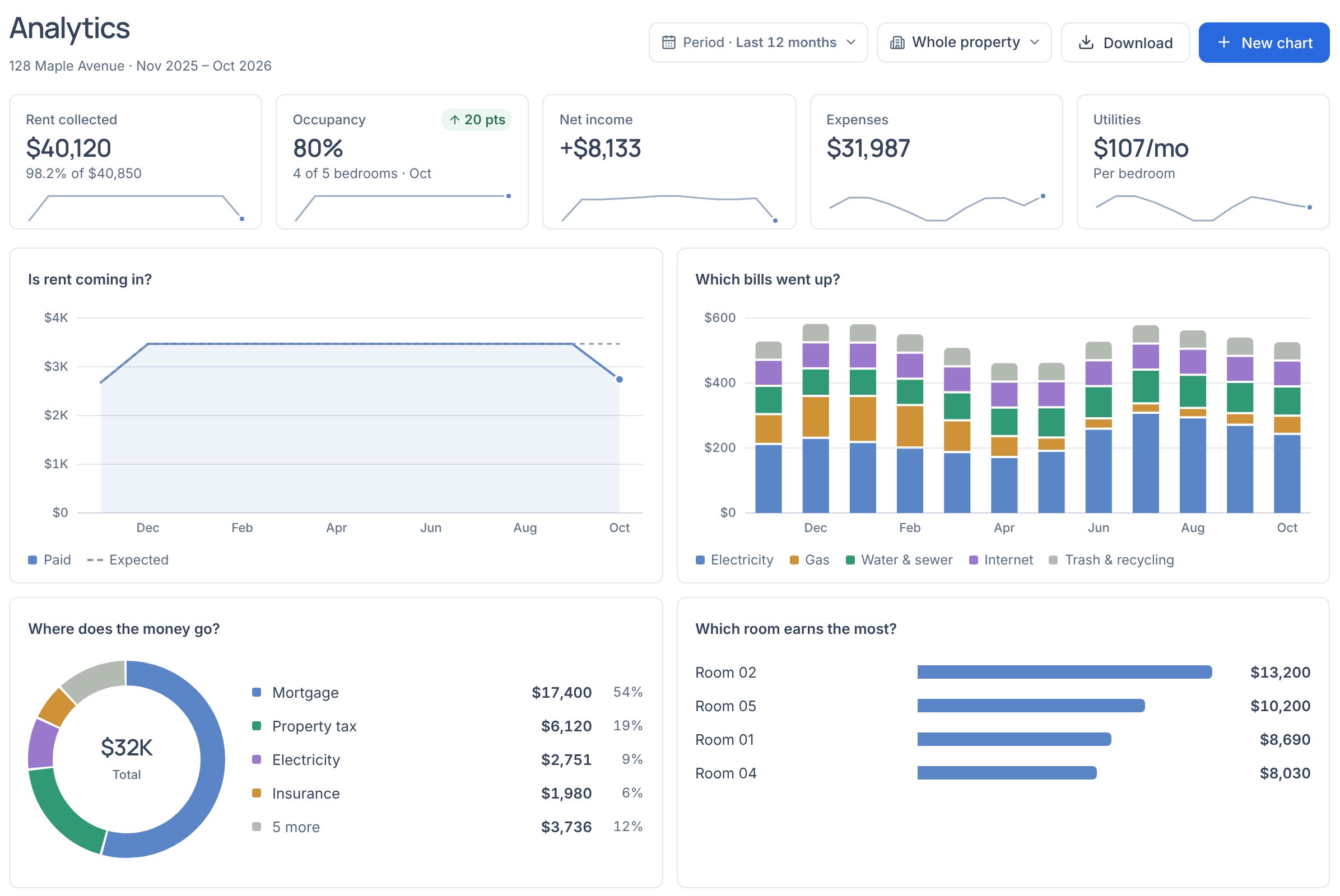
How full your houses are, how much rent came in, what each one costs and earns, down to a unit or a room.
On this page
Read the page
- The tiles show rent collected, occupancy, net income, expenses and utilities per room, each against the period before (occupancy, a year before).
- Period picks the last 12 months, this year so far or a past year. On one property, the place picker narrows everything to a unit or a room.
- Hover a chart to read each month. The table at the bottom breaks the same figures down by property, or by unit and room.
- Download gets every figure by month.
Make a chart
- New chart opens a worksheet: pick a measure and a field to lay it out by (month, property, unit, room or category) from the list on the left, or drag one onto a shelf. Split stacks it by type or property. The chart and its numbers update as you go.
- Hover a chart to edit, download or remove it. Standard charts in the … menu puts the starting set back.